
EN
You land on a new online clothing store. Prices are suspiciously low, but before you can second-guess yourself, you notice a glowing green badge at the bottom of the page: "ScamAdviser: 100% Safe." You relax. Someone already vetted this place. You pull out your credit card.
You've just been played.
This is one of the more darkly ironic tricks in the modern scammer's playbook: using a brand built to expose scam websites as a tool to run a scam website. The growing ScamAdviser badge scam has become one of the more convincing tactics used in online shopping scams because most people never think to question a security badge.
Let's get this out of the way immediately: ScamAdviser does not offer trust seals, verification logos, or "approved" badges for websites to display.
There is no badge program. There is no certification you can pay for or earn. There is no graphic file ScamAdviser emails to websites that pass their checks.
So if you see a ScamAdviser badge on a site, it is a fake. These are fake trust badges, often created in Canva or stolen from image searches. They are also fake verification badges designed to create a false sense of safety.
Their presence tells you nothing about the site’s legitimacy. Instead, it is one of the clearest scam website warning signs you can encounter.
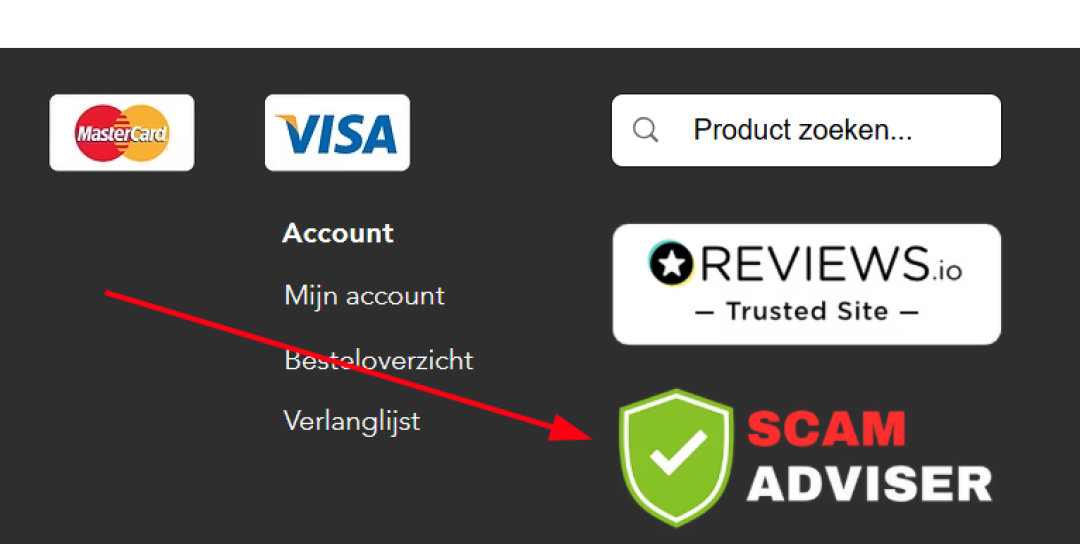
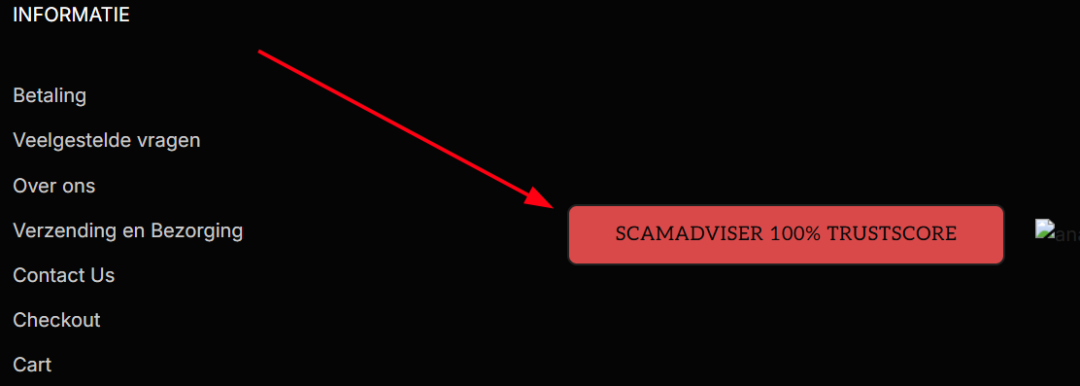
Online shoppers have been trained to look for signals of legitimacy before they buy. The padlock icon in the browser bar. A McAfee or Norton seal in the footer. Trustpilot stars near the checkout button. These signals exist because they once meant something, and scammers have studied them carefully.
The term for what they're doing is trust washing: borrowing the visual language of security to give a sketchy operation a legitimate-looking coat of paint. This is where fake website security seals and fake trust badges are used to mimic legitimate trust signals and push users into buying without thinking.
ScamAdviser is a particularly clever brand to steal for this purpose. It's a name people associate with checking whether a site is safe. If a shopper sees it in the footer, the instinct is to think, "Oh good, someone already ran this site through the checker." The whole point is to stop you from actually opening a new tab and doing that check yourself. That’s exactly what scammers want. It turns a moment of caution into one of the most common failures in online shopping scams.
The badge isn't proof of safety. It's a shortcut designed to make you skip the step that would expose the lie.
To understand why a copied badge is meaningless, you need to understand what goes into a real ScamAdviser Trust Score.
When ScamAdviser evaluates a website, it doesn't have a human sit down and poke around. It runs an automated algorithm that pulls data from over 40 independent sources, then generates a Trust Score between 1 and 100. The score updates dynamically as new information comes in.
Here's what that algorithm actually looks at:
The score that comes out of all that is a live number. It changes when new complaints come in. It changes when the domain gets older. It changes when a site suddenly stops appearing on Google's index. That is why, fake website security seals, or a static .png file sitting in a website footer cannot reflect any of that. It's a photograph of a concept that doesn't apply to the site displaying it.
This is why relying on fake verification badges is so dangerous.
If you truly want to know how to check if a website is safe, you need to use the actual ScamAdviser tool, not an image on a website.
Here's the counterintuitive truth that should stick with you: finding a "ScamAdviser Safe" badge on an unfamiliar e-commerce site is itself a reason to be more suspicious, not less.
Legitimate businesses don’t rely on fake trust badges or manufactured seals. They let real reputation data speak for itself.
The moment a site starts using fake verification badges or fake website security seals, it raises immediate concerns about intent and credibility.
This is one of the clearest scam website warning signs available today.
It's the digital equivalent of a stranger on the street showing you a badge that says "CERTIFIED TRUSTWORTHY PERSON." The effort to perform legitimacy is the tell.
The good news: the real version of ScamAdviser is free and takes about ten seconds to use. It is one of the easiest ways on how to check if a website is safe online.
Do this instead of trusting a footer badge:
Open a new browser tab. Go to scamadviser.com. Paste the URL of the store you're considering. Read the actual score.
That's it. You're looking at a live result based on real data, not a picture someone dropped into a footer at 2am before launching their fake storefront.
A few other habits worth building:
The scammers using fake ScamAdviser badges are counting on one thing: that you'll trust the badge and skip the check. The fix is simple but it requires a habit shift.
No badge on a website proves anything. The only score that means something is the one you look up yourself.
Have you spotted a fake security badge on a suspicious website? You can report it directly to ScamAdviser and help protect other shoppers.
Adam Collins is a cybersecurity researcher at ScamAdviser who operates under a pseudonym for privacy and security. With over four years on the digital frontlines, he specialises in translating complex threats into actionable advice. His mission: exposing red flags so you can navigate the web with confidence.

